
VCenter - Forget vertical centering once and for all
"Can you align this paragraph vertically with the image on its side ?"
I heard this countless of times. I did it even more. But I can't help it. The two first words that come to my mind when it comes to vertical centering are "Oh Shit".
The next thoughts are a list of potential arguments I could use to not do it, even the weaker ones.
After - and only after - come the more reasonable, logical thoughts. "She's right, it would look better". "It would help clear the page"...
Vertical centering has a very unique feeling associated with it for many developers. I personally believe it's an evil lieutenant of Internet Explorer 5 and its CSS abominations.
It's like a baptism by fire for many junior web developer. We even make memes about it.
The funny thing is: we know how to fix it, it almost never has been an impossible thing to do.
There are countless examples on Internet. StackOverflow only has more than 150000 entries on the subject. Yet, this is probably one of the most discussed topic about Web development, and junior developers keep struggling with this.
After more than 15 years of web development, I still have this emotional struggle personally. I never remember the exact rules that I should use. I try to find a way to avoid it somehow. It would be simpler to have a component that does it, quickly and simply, and finally forget about it.
That is why it felt natural to me to start this toolbox with <VCenter>, a simple, yet useful component.
The problem
I guess I don't have to explain much about this... But for the sake of consistency, let's just illustrate with an image:
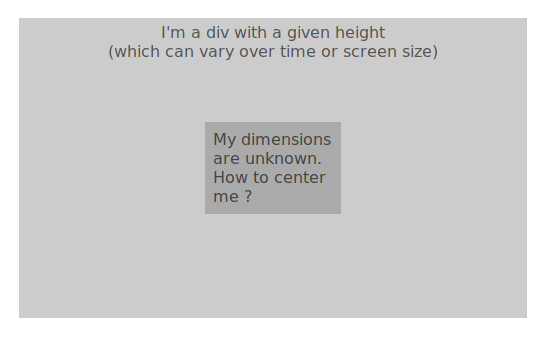
Any rookie goes through this at least once. "That should be easy. There is this vertical-align rule. That should do it, right ?".
But you're not seeing that entity from hell watching you, rubbing hands and laughing as you enter the rabbit hole.
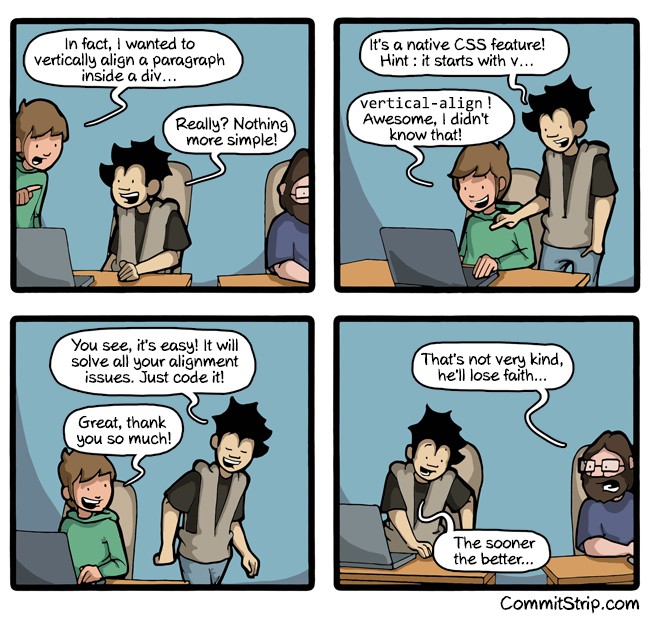
For historical reasons presented in a different article, vertical centering is not only feeling like wizardry. It's also very confusing.
Fortunately, many solutions exist. It shouldn't be hard to make a component that solves 90%+ of the cases, and forget about this problem once and for all.
How I've solved this
I will make a component that should cover this:
- According to the rules, it should not use JS apart from React, since pure-CSS solutions exist,
- Its direct parent should have defined height (See the article about height for why we need that),
- It will take the whole space of the parent. That means it is likely going to be a
position: absoluteelement, - I won't try to cover all the corner-cases. It would be too long (150000+ SO results, remember ?). After all, if I need a different solution for less that 10% of the cases, it's no big deal.
Let's go.
The intuitive way for this component to be used would be like this:
<div>
    <VCenter>
        <p>I'm vertically centered ❤️</p>
        <!-- or anything else -->
    </VCenter>
</div>
Let's code !
From a React point of view, it fairly simple.
There is no specific parameters to account with.
I don't need to worry about shouldComponentUpdate either.
The render function is simple enough to let the children decide whether they should update or not.
I only need props.children, a few styling, and we're good to go.
Let's write it as a function then:
function VCenter(props) {
    return (
        <div style={{display: 'flex', alignItems: 'center', position: 'absolute', width: '100%', height: '100%', left: 0, top: 0}}>
            <div>{props.children}</div>
        </div>
    );
}
I used the flexbox solution as it is well supported by modern browsers.
Let's check the result:
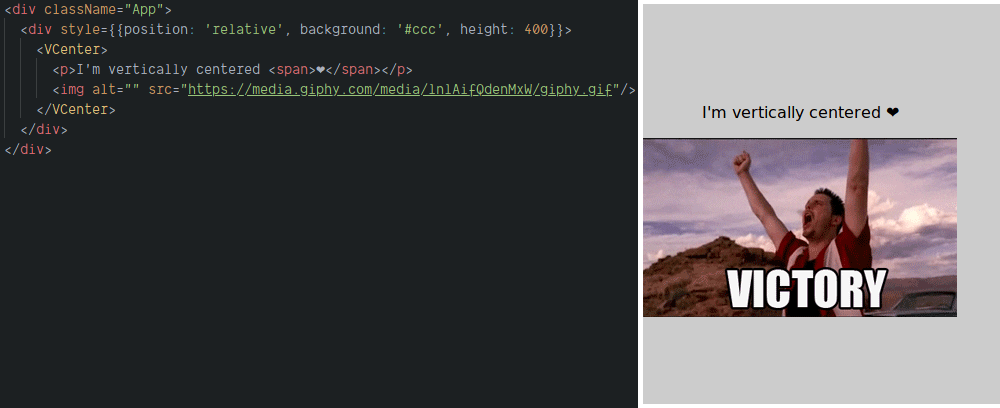
That was easy. Now, without surprise, it is not working on IE 9.
Getting IE8-IE9 into the ranks
A very good article on CSSTricks gives us a solution for older browsers:
.parent {
  display: table;
  width: 100%;
}
.parent > .child {
  display: table-cell;
  vertical-align: middle;
}
NOTE: This solution will not working for IE7 and below, but those browsers are not supported for a very long time. No need to worry about that so much.
To add this in the component, I defined the styles to be used at boot then use it according to the browser signature. Thanks to React, we don't need CSS hacks like in the old days.
const ieVersion = getIEVersion(); // Returns 0 if not IE, or the number if IE
const isIE9 = 0 < ieVersion && ieVersion <= 9;

const commonStyle = {
    position: 'absolute', width: '100%', height: '100%', left: 0, top: 0,
};
const parentStyle = Object.assign({}, commonStyle, isIE9 ? {
  display: 'table',
} : {
  display: 'flex', alignItems: 'center',
});

const childStyle = isIE9 ? {
    display: 'table-cell', verticalAlign: 'middle',
} : null;

const VCenter = (props) => {
    return (
        <div style={parentStyle}>
            <div style={childStyle}>
                {props.children}
            </div>
        </div>
    );
}
Result:
Looking good. But is it ?
I have this intuition that maybe the dimensions are not the same in both cases. Let's check:
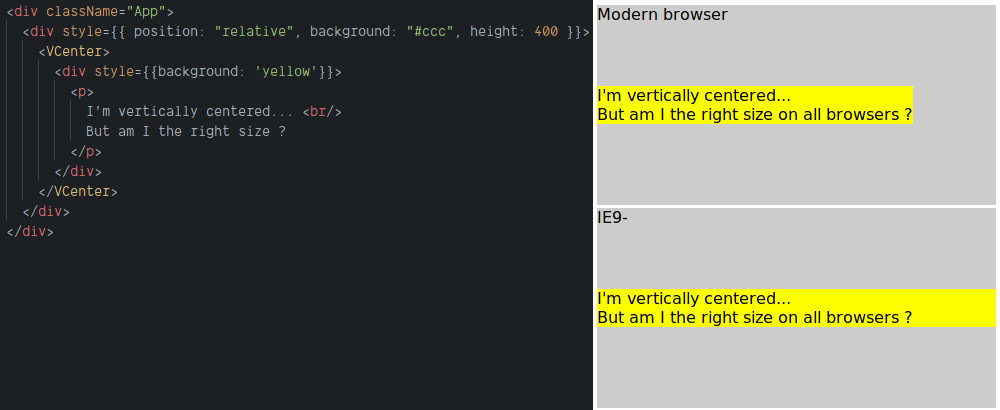
Of course not...
A difference in padding sizes would have been okay, but this is too different. It could lead to cross-browser issues. And I don't like issues.
Adding an extra div with display: inline-block in the IE version should do the trick:
const VCenter = (props) => {
    return (
        <div style={parentStyle}>
            <div style={childStyle}>
                {isIE9 ? (
                    <div style={{display: 'inline-block'}}>{props.children}</div>
                ) : (
                    props.children
                )}
            </div>
        </div>
    );
}
Result:
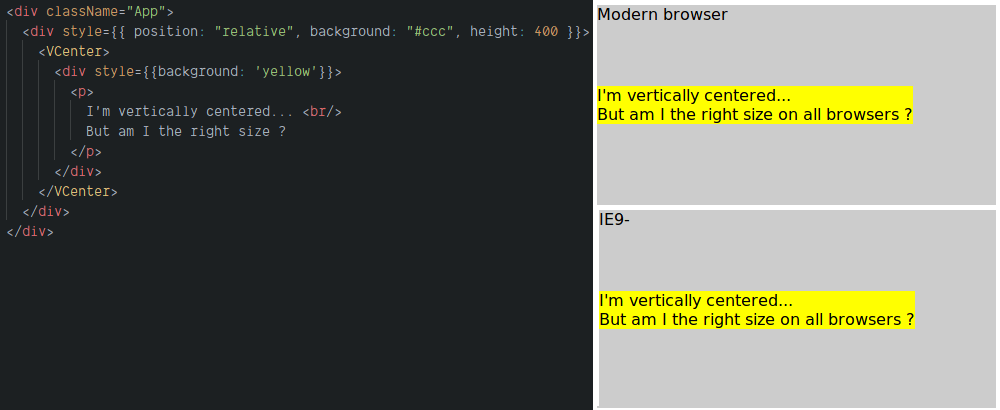
Better !
Conclusion
This component is obviously no rocket science - this toolbox is not meant to.
As I wrote above, it is more about the availability of a quick vertical centering solution that matters.
It even works in IE7+. This is also a great thing to know. Less IE-related issues is always good news.
I'm using VCenter for a while now, and I strongly encourage you to have your own (feel free to copy mine if you like).
It won't fix all vertical centering problems, but it will be a good match for many of them. No more "Oh Shit".